
How Long Does an MRI Take? Times by Body Part 2026 October
How long does an MRI take? Most scans run 15–90 minutes. 💡 See exact times by body part, what affects scan length, and tips to get through it faster.
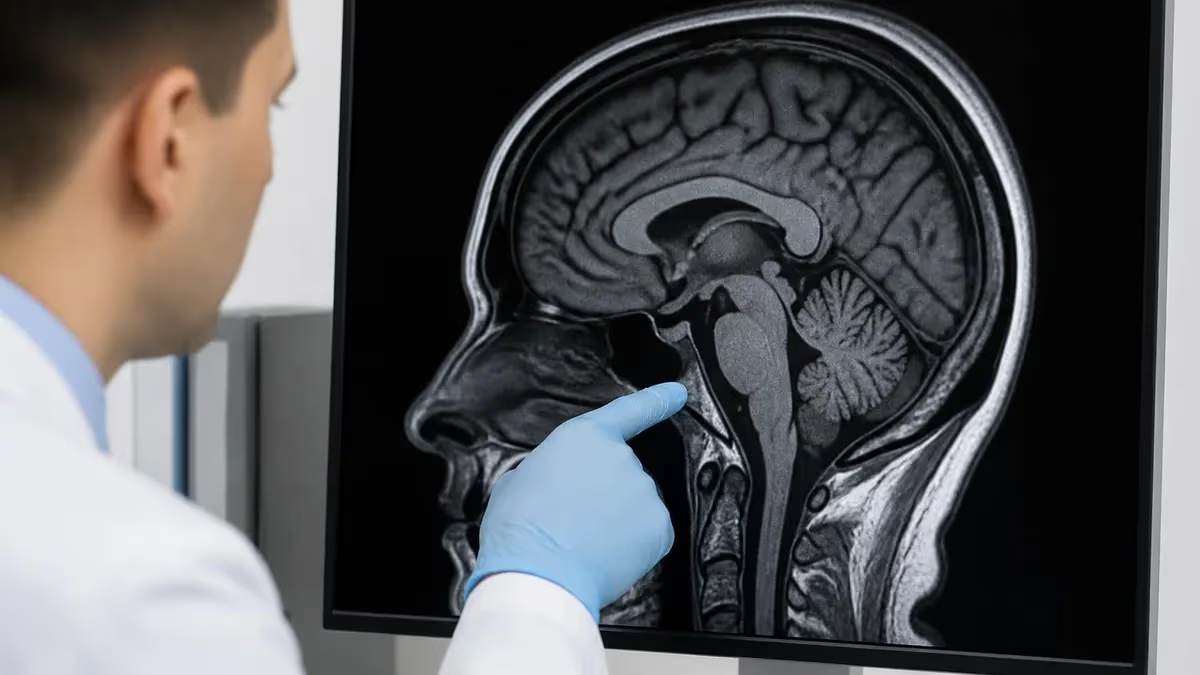
If you've got an MRI scheduled and you're wondering how to plan your day around it, you're not alone. "How long does an MRI take?" is one of the most common questions patients ask before stepping into that loud, narrow tube. The honest answer: it depends—but you'll typically spend anywhere from 15 minutes to well over an hour in the scanner, depending on what's being imaged and whether contrast dye is involved.
Most routine MRI scans fall in the 30–60 minute range. That said, a quick brain MRI for a concussion follow-up might wrap up in 20 minutes, while a full spinal series could keep you on that table for 90 minutes or more. Knowing what to expect takes a lot of the anxiety out of the experience—and MRI anxiety is real for a lot of people.
This guide breaks down scan times by body part, explains the key factors that stretch (or shrink) your appointment, and gives you practical tips so you go in prepared.
MRI Scan Times by Body Part
Different anatomical regions require different numbers of imaging sequences, which is the main reason scan durations vary so much. Here's a realistic breakdown based on standard clinical protocols:
- Brain MRI: 30–60 minutes. A basic brain scan often finishes around 30–45 minutes. Add contrast dye or a more detailed protocol (say, for epilepsy or MS follow-up) and you're looking at closer to 60 minutes.
- Spine MRI: 45–90 minutes. Lumbar (lower back) scans typically run 45–60 minutes. Cervical (neck) and thoracic (mid-back) are similar. If your doctor orders the full spine in one session—sometimes done for multiple sclerosis workups—block out 90 minutes or more.
- Knee MRI: 30–45 minutes. This is one of the faster scans. You'll lie with your leg in a specialized coil, and most knee protocols finish in under 45 minutes.
- Shoulder MRI: 45–60 minutes. Shoulders are anatomically complex, so technologists typically run more sequences than a knee. Arthrogram MRIs (where contrast is injected directly into the joint) add extra time for the injection procedure beforehand.
- Abdomen/Pelvis MRI: 45–75 minutes. Abdominal scans are trickier—you have to coordinate with your breathing, which can require repeated sequences if motion artifacts appear. Pelvic MRIs for prostate or gynecologic imaging often include multi-parametric sequences that push the time toward 60–75 minutes.
- Breast MRI: 45–60 minutes. Breast MRI almost always includes contrast, and patients lie face-down in a specialized breast coil. Plan for at least 45 minutes on the table.
- Heart (Cardiac MRI): 60–90 minutes. Cardiac MRI is technically demanding—your heart won't sit still, so the scanner has to synchronize with your heartbeat. It's one of the longer scans and requires an experienced team.
- Wrist, hand, or foot: 20–40 minutes. Extremity scans of small joints are generally the fastest MRIs you'll encounter. Some dedicated open extremity scanners can finish in 20 minutes.
What Makes an MRI Take Longer?
The raw anatomy is just one part of the equation. Several other factors can add significant time to your scan—some within your control, some not.
Contrast vs. No Contrast
Gadolinium-based contrast agents are used to highlight inflammation, tumors, blood vessels, and abnormalities that might be invisible on non-contrast images. If your scan requires contrast, a technologist will insert an IV line (if you don't already have one), inject the dye mid-scan, and then run additional sequences. That process typically adds 10–20 minutes to the total time. You'll also wait a few minutes after the injection before the next sequences begin, since the dye needs to distribute through your tissues.
Number of Sequences
Each distinct set of images is called a sequence—think of it like a different camera setting capturing a different slice of information. A basic knee might use 5–6 sequences. A detailed brain scan for tumor staging could use 10 or more. More sequences = more time, simple as that. Your radiologist sets the protocol based on what your doctor is looking for, so you can't exactly negotiate the number—but knowing this helps explain why one MRI feels so much longer than another.
Patient Movement
MRI images are extremely sensitive to motion. Even swallowing during a cervical spine scan can blur the images enough to require a repeat sequence. If you shift around, cough, or can't hold still, the technologist may need to rerun one or more sequences from scratch. This is probably the single biggest variable that patients can actually influence. More on that below.
Scanner Field Strength
Higher-field scanners (3T) can acquire images faster and at higher resolution than older 1.5T units, though the clinical difference for scan time isn't always dramatic. Open MRI scanners—which many claustrophobic patients prefer—often use lower field strengths and may take longer to acquire the same images. If scan time is a priority, ask whether a closed high-field scanner is an option for your type of study.
Functional or Specialized Protocols
Functional MRI (fMRI), diffusion tensor imaging (DTI), MR spectroscopy, and other advanced protocols dramatically extend scan time. These are typically research or highly specialized clinical scans. If your order includes any of these, your technologist should tell you upfront to expect a longer session—sometimes 2 hours or more.
Technical Issues and Re-scanning
Equipment glitches happen. RF noise from a malfunctioning gradient coil, a patient call button accidentally pressed mid-sequence, or an image artifact that the radiologist wants re-run can all add 10–20 minutes. It's uncommon, but it's worth knowing that the estimated time you're given isn't always what you'll actually experience.
What Happens to Total Appointment Time?
The scan itself is only part of your appointment. Here's a more realistic picture of total time at the imaging center:
- Check-in and paperwork: 10–15 minutes — Metal screening questionnaire, insurance verification, changing into a gown.
- Pre-scan screening: 5–10 minutes — The technologist reviews your questionnaire, checks for contraindications (pacemakers, metal implants), and asks follow-up questions.
- Positioning and coil setup: 5–10 minutes — Getting you comfortable on the table, placing the appropriate coil around the body part being imaged.
- Actual scan: 15–90 minutes — The part we've been discussing.
- IV removal and discharge: 5 minutes — If contrast was used.
Add it up and a "30-minute scan" easily becomes a 60–75 minute appointment at the facility. A 60-minute scan might mean you're there for 90 minutes or more. Budget accordingly when you schedule time off work.
If you're interested in MRI scan preparation and what the procedure actually involves, that's a solid overview of the full experience. And if you're studying for credentialing, our resources on magnetic resonance imaging cover the technical side in depth.
Tips to Get Through Your MRI Faster (and Calmer)
You can't control how many sequences your radiologist ordered, but you can absolutely control whether those sequences need to be repeated. Here's what actually helps:
Don't Move — Seriously
This sounds obvious, but it's harder than it sounds when you've been lying still for 40 minutes and your nose itches. Before the scan starts, get your body into the most comfortable position you can sustain. Ask for a foam wedge under your knees if your lower back tends to ache. Scratch any itches before you slide into the bore. The few seconds of comfort prep can save you 10 minutes of rescan time.
Ask for Earplugs or Headphones
MRI scanners are genuinely loud—some sequences hit 110 decibels, comparable to a jackhammer. The noise isn't harmful with proper hearing protection, but it's startling if you're not ready for it. Most facilities offer earplugs automatically; many also offer music through MRI-compatible headphones. The music helps pass the time and gives you a focal point instead of the banging.
Communicate Before, Not During
If you're claustrophobic, tell your referring doctor and the scheduling staff before your appointment. There are options—open MRI, mild sedation, or anti-anxiety medication—that require advance planning. Showing up at the scanner and announcing severe claustrophobia mid-setup delays your scan and potentially everyone else's after you.
Avoid Loose Metal
You'll be screened, but make sure you've removed everything metal before arriving—or at minimum before changing into your gown. Jewelry, hair clips, underwire bras, piercings, and even some cosmetics with metallic components need to come off. Metal causes image artifacts and, depending on the item, can be a safety hazard. Having to track down a safe place for your jewelry mid-appointment just adds time.
Ask What to Expect for Your Specific Scan
When the technologist is positioning you, ask them to briefly describe what each sequence will sound like and roughly how long it'll run. Many technologists will say something like "this next one is about 4 minutes and sounds like rapid clicking." That kind of heads-up makes the noises feel predictable rather than alarming, which makes it much easier to stay still.
MRI with Sedation or Anesthesia
For patients who can't hold still due to severe anxiety, dementia, or pediatric cases, sedation or general anesthesia is sometimes used. This extends total time significantly—you'll need time for anesthesia preparation, the scan itself, and recovery. Pediatric MRI under anesthesia is common because children can't reliably stay still, and the entire appointment at a children's hospital might run 2–4 hours when you factor in anesthesia induction and recovery. If your child is scheduled for sedated MRI, your team will give you detailed pre-appointment instructions including fasting requirements.
How Long Does an Open MRI Take vs. Closed MRI?
Open MRI scanners don't enclose you in a tube—they're more comfortable for claustrophobic patients and those with larger bodies. The trade-off is typically lower field strength (often 0.7T or 1.5T open vs. 3T closed), which can mean longer scan times to achieve comparable image quality. An open MRI knee scan that takes 30 minutes on a closed 3T scanner might take 45–50 minutes on a lower-field open unit. The clinical difference in image quality also matters for some diagnoses—your doctor or radiologist can advise whether open MRI is appropriate for your specific scan.
For career-related questions about becoming an MRI technologist, check our guide on MRI tech school and information about MRI tech salary expectations. Understanding MRI safety is also critical—both for patients and technologists in training.
What to Do After Your MRI
Most patients can leave immediately after their scan and resume normal activities—there's no recovery time for a standard MRI without sedation. If contrast was used, drink plenty of water to help your kidneys flush the gadolinium. Results typically take 24–72 hours; your radiologist reads the images and sends a report to your referring physician, who will contact you with findings.
If you had sedation, you'll need someone to drive you home and should plan to rest for the remainder of the day. Don't make major decisions or operate heavy machinery for 24 hours after any sedation or anesthesia.
Sample MRI - Magnetic Resonance Imaging Practice Questions
Try these questions from our free MRI - Magnetic Resonance Imaging practice tests. The correct answer and an explanation follow each question.
Which gradient is responsible for determining slice position in a 2D MRI acquisition?
- A. Frequency-encoding gradient
- B. Phase-encoding gradient
- C. Slice-selection gradient
- D. Spoiler gradient
Answer: C. Slice-selection gradient
The slice-selection gradient is applied simultaneously with the RF pulse to excite only protons in the desired anatomical plane.
The apparent diffusion coefficient (ADC) map is calculated to eliminate which confounding effect in DWI?
- A. T2 shine-through
- B. T1 recovery
- C. Gibbs ringing
- D. Chemical shift misregistration
Answer: A. T2 shine-through
ADC maps remove T2 shine-through by computing the diffusion coefficient from multiple b-values, isolating true diffusion restriction from long-T2 tissue signal.
Which MRI sequence is most sensitive for detecting early bone marrow edema in stress fractures?
- A. T1-weighted SE
- B. GRE in-phase
- C. STIR or fat-saturated T2
- D. Proton density without fat saturation
Answer: C. STIR or fat-saturated T2
STIR and fat-saturated T2 sequences suppress the bright fat signal of normal marrow, making the high-signal edema of stress fractures conspicuous.
Which of the following changes will increase spatial resolution without changing the FOV?
- A. Increasing the matrix size
- B. Decreasing the matrix size
- C. Increasing slice thickness
- D. Increasing NEX
Answer: A. Increasing the matrix size
Increasing matrix size means more phase and frequency encoding steps, reducing voxel size and improving spatial resolution within the same FOV.
Take the full MRI - Magnetic Resonance Imaging practice test
Preparing for Your MRI: A Quick Checklist
Before your appointment, run through this checklist to avoid delays and make sure your scan goes smoothly:
- Tell your doctor about all metal implants, surgical hardware, pacemakers, or cochlear implants—some are MRI-incompatible, and this needs to be cleared before scheduling.
- Wear comfortable, metal-free clothing, or plan to change into a hospital gown.
- Leave jewelry, piercings, and hair accessories at home or in your car.
- If you're claustrophobic, ask your doctor about anti-anxiety medication or sedation options at least a few days before your scan.
- For contrast scans, make sure your kidney function has been checked recently (usually a creatinine blood test).
- Follow any fasting instructions given by the scheduling team for abdominal or pelvic scans.
- Bring your insurance card, photo ID, and the order from your referring physician.
- Budget extra time—add 30–45 minutes to the quoted scan time for your total facility visit.
Understanding the MRI machine itself—how it works and what to expect from it—can also reduce anxiety significantly before your first scan. Knowledge is genuinely calming when you know exactly what that noise is and why it's happening.
If you're a student or professional in the field, our MRI vs CT scan comparison covers the technical and clinical differences between the two most common cross-sectional imaging modalities. And if you want to explore working in MRI, our resources on MRI tech school and magnetic resonance imaging credentials are a great starting point.
The bottom line on MRI timing: most scans run 30–60 minutes, you'll spend 60–90 minutes total at the facility, and staying still is the single biggest thing you can do to keep your scan efficient. Go in informed, stay calm, and you'll be done before you know it.
About the Author

Medical Laboratory Scientist & Clinical Certification Expert
Johns Hopkins UniversityDr. Sandra Kim holds a PhD in Clinical Laboratory Science from Johns Hopkins University and is certified as a Medical Technologist (MT) and Medical Laboratory Scientist (MLS) through ASCP. With 16 years of clinical laboratory experience spanning hematology, microbiology, and molecular diagnostics, she prepares candidates for ASCP board exams, MLT, MLS, and specialist certification tests.
Join the Discussion
Connect with other students preparing for this exam. Share tips, ask questions, and get advice from people who have been there.
View discussion (8 replies)