
Microsoft Excel Training: Complete Guide 2026 September
Microsoft Excel training guide — 🧠 free and paid resources, skill levels, certifications, learning paths, and how to choose the right training option.

Microsoft Excel training covers the wide range of educational programs, courses, certifications, and self-learning resources designed to build Excel skills from beginner basics through advanced expert-level capabilities. Excel remains one of the most widely used business software applications globally, with hundreds of millions of users across industries ranging from finance and accounting through healthcare, manufacturing, education, and government. Strong Excel skills consistently rank among the most valuable and most-requested workplace capabilities, making Excel training a high-return investment for both individual career development and organizational productivity improvement.
This guide walks through the Microsoft Excel training landscape including beginner foundational skills, intermediate analytical capabilities, advanced features, certification options, free versus paid training resources, classroom versus self-paced learning, and how to choose the right training path based on your current skills and career goals. Information here applies to current Microsoft 365 Excel along with Excel 2019, 2021, and Excel for the Web. Whether you're just starting with Excel, building skills for career advancement, or pursuing certification credentials, this overview covers the essentials of Microsoft Excel training options.
The Microsoft Excel training market includes Microsoft's own learning resources, Microsoft Learning partner training providers, third-party online course platforms, university and community college courses, books and self-study materials, YouTube tutorials, and various workplace training programs. Costs range from completely free (Microsoft's own resources, YouTube, free courses) through hundreds of dollars (online course platforms) to thousands of dollars (intensive bootcamps, classroom training, certification preparation programs). The right choice depends on your learning style, time availability, budget, and specific skill goals you're working toward in your Excel career development journey.

Microsoft Excel Training Quick Facts
Free options: Microsoft Learn (learn.microsoft.com), GCFGlobal Excel tutorials, ExcelJet, YouTube channels (Excel Campus, Leila Gharani, MrExcel). Paid platforms: Coursera, Udemy, LinkedIn Learning, Pluralsight typically $20-$200 per course. Classroom training: $300-$2,500+ depending on length and depth. Microsoft certifications: Microsoft Office Specialist (MOS) Excel Associate and Expert. Time commitment: 20-40 hours for solid intermediate; 100+ hours for advanced/expert. Skill levels: Beginner, Intermediate, Advanced, Expert with progressively complex features and applications.
Beginner Excel training covers foundational skills every Excel user needs. Topics include navigating the Excel interface (ribbon, formula bar, name box, status bar), entering and editing data, basic formatting (bold, colors, borders, number formats), simple formulas (SUM, AVERAGE, COUNT, basic arithmetic), saving and opening files, basic printing, simple sorting and filtering, and basic chart creation. Most beginners can complete foundational training in 8-15 hours of focused study. Free resources from Microsoft Learn and GCFGlobal cover beginner topics comprehensively. After completing beginner training, users can perform most everyday Excel tasks for personal and basic professional use.
Intermediate Excel training builds on the foundation with substantially more powerful features. Topics include advanced formulas (IF, VLOOKUP/XLOOKUP, INDEX/MATCH, SUMIFS, COUNTIFS), conditional formatting, data validation, named ranges, advanced filtering, basic PivotTables, more sophisticated charts including combination charts, working with dates and times in formulas, text functions (LEFT, RIGHT, MID, FIND, CONCATENATE), and basic analysis functions. Intermediate training typically requires 20-40 hours total. This level supports most professional Excel work in business analyst, accounting, and similar roles where Excel is a core tool.
Excel Skill Levels
Interface navigation, basic formulas, formatting, simple charts, data entry. 8-15 hours.
VLOOKUP, IF, conditional formatting, PivotTables, data validation. 20-40 hours total.
Power Query, advanced PivotTables, dynamic arrays, complex formulas, dashboards. 60-100 hours.
VBA macros, advanced Power Query, Power Pivot, complex modeling, automation. 100-200+ hours.
Financial modeling, data analysis, business intelligence, specific industry applications.
Microsoft Office Specialist (MOS) Excel Associate (intermediate), Expert (advanced).
Advanced Excel training covers sophisticated features that distinguish power users from intermediate users. Topics include Power Query for data transformation and import automation, advanced PivotTable techniques including calculated fields and pivot charts, dynamic array functions (UNIQUE, FILTER, SORT, LAMBDA in newer Excel), advanced conditional formatting with formulas, complex nested formulas combining multiple functions, what-if analysis (Goal Seek, Solver, Data Tables, Scenarios), array formulas, advanced charts and dashboards, and integration with other Microsoft 365 applications. Advanced training typically requires 60-100 hours total. This level supports analytical roles where sophisticated data manipulation drives professional value.
Expert Excel training adds the most sophisticated capabilities including VBA programming for automation, Power Pivot and Data Models for analyzing very large datasets, advanced financial modeling techniques, sophisticated dashboard design, complex multi-workbook integration, and various other capabilities. Expert-level Excel users are scarce — only a small percentage of users reach this level. The investment requires 100-200+ hours of dedicated learning beyond intermediate skills. The payoff for those who reach expert level is substantial — premium compensation, automation of work that less skilled users do manually, and capability to build sophisticated business systems entirely in Excel.
Microsoft Office Specialist (MOS) certifications provide formal credentials for Excel skills. The MOS Excel Associate certification covers intermediate-level skills suitable for general business use. The MOS Excel Expert certification covers advanced skills suitable for analytical roles. Both require passing performance-based examinations testing actual skill rather than just multiple-choice knowledge. Examination costs typically run $100-$200 through Certiport testing centers. Preparation typically requires 20-50 hours beyond actual Excel skill development time. Many job postings list MOS Excel certification as preferred or required for analytical positions, supporting career advancement for certified holders.
Microsoft Learn: learn.microsoft.com — official Microsoft training, free, covers all skill levels. GCFGlobal: edu.gcfglobal.org/en/excel — beginner-friendly free tutorials. ExcelJet: exceljet.net — function references, formulas, video tutorials. YouTube channels: Excel Campus (Jon Acampora), Leila Gharani, MrExcel, Computergaga — extensive free video content. Office support docs: support.microsoft.com — official documentation. Best for: Self-motivated learners with time but limited budget.
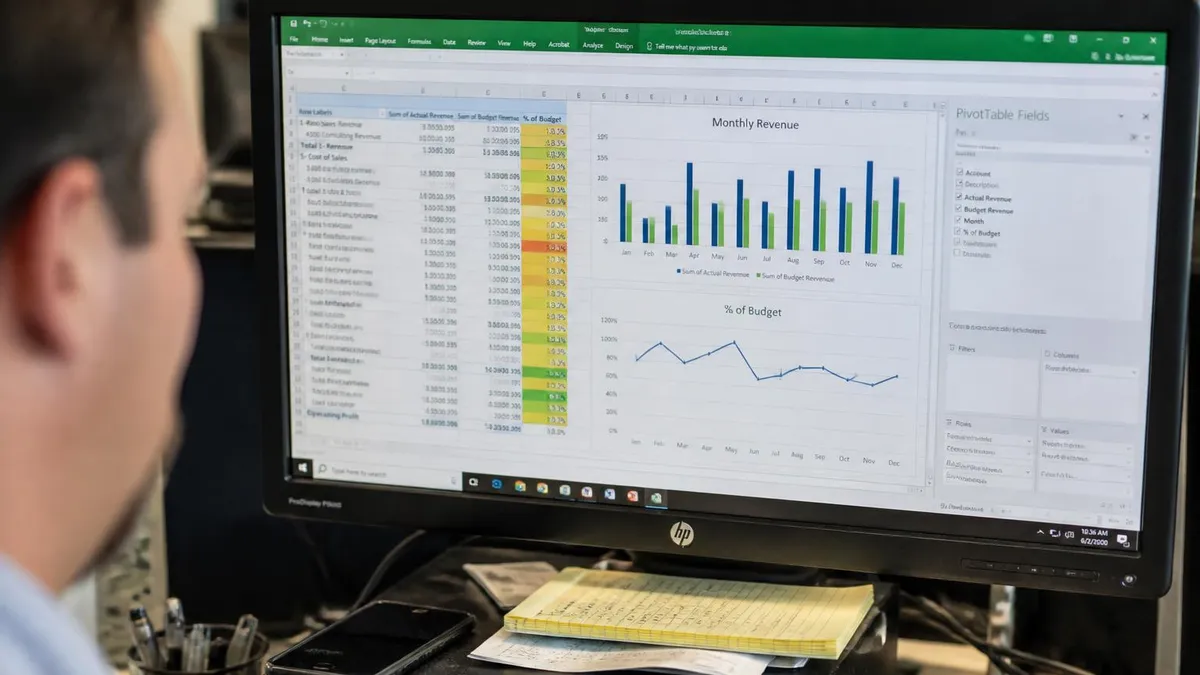
For users choosing between free and paid Excel training, several factors matter. Free resources work excellently for self-motivated learners who can structure their own learning path. Microsoft Learn provides comprehensive official content. YouTube channels offer hundreds of hours of video content covering specific topics. Free training requires self-discipline to progress through material consistently, and the lack of assessments means you must self-evaluate your skill development. Paid courses provide structured curricula with assessments verifying skill acquisition, instructor support for questions, and certificates that some employers value. Match your choice to your learning style and accountability needs.
For users wanting to assess their current Excel skills before training, several self-assessment approaches help. Try common intermediate tasks: build a VLOOKUP formula, create a PivotTable, apply conditional formatting with a formula, sort data with multiple criteria. If these feel difficult, beginner training will help. If these feel easy but advanced features (Power Query, dynamic arrays, what-if analysis) are unfamiliar, intermediate-to-advanced training is appropriate. Online skill assessments through job sites and learning platforms provide more structured evaluation. Honest self-assessment ensures training time investment matches your actual skill development needs.
For users wanting to use Excel skills more strategically in their careers, several considerations help. Identify your specific career path and what Excel skills support it. Financial roles benefit from financial modeling and PivotTables. Data analysis roles need Power Query and dashboards. Marketing roles benefit from data visualization. Operations roles use Excel for various reporting. Each career path has different skill priorities. Targeting training to your specific role accelerates career-relevant skill development versus general Excel training that covers everything but may not deeply develop the specific skills your role most values.
Watching Excel training videos without hands-on practice produces limited skill development. Reality: Excel skills require muscle memory and problem-solving practice that only develops through actually using Excel. Best practice: Follow along with training using actual Excel — pause videos to try techniques yourself. Apply new techniques to real or realistic data scenarios immediately. Practice multiple scenarios using each technique. Build small projects exercising what you've learned. Common mistake: Watching hours of training feeling like you're learning, but skills don't transfer to actual Excel work because you didn't practice. Allow time for hands-on practice equal to or greater than passive watching time.
Specific Excel features that benefit most professionals include several core capabilities worth deliberate skill development. PivotTables remain one of the most valuable Excel features for data analysis — investing time in PivotTable mastery returns dividends across nearly every analytical role. VLOOKUP and XLOOKUP functions are essential for data combination and lookup operations. Charts and visualizations support communication of analytical findings. Power Query has become increasingly important for data transformation workflows. Conditional formatting supports data quality checks and visual analytics. Each of these features warrants substantial focused training time as part of comprehensive Excel skill development.
For users wanting to learn VBA (Visual Basic for Applications) for Excel automation, VBA training represents a substantial step beyond standard Excel. VBA enables creating macros for repetitive task automation, custom functions extending Excel's built-in functions, and complex business applications running entirely in Excel. VBA training typically requires 40-80+ hours beyond intermediate Excel skills. Free VBA resources include WiseOwlTutorials YouTube channel, Excel Macro Mastery (Paul Kelly), and various others. Paid resources include comprehensive courses on Coursera, Udemy, and LinkedIn Learning. VBA skills add substantial career value but represent significant additional learning investment.
For users wanting to integrate Excel with Power BI and broader Microsoft 365 ecosystem, several training paths support broader business intelligence skills. Power BI training (separate but related to Excel) covers the dedicated business intelligence tool. Power Query skills transfer between Excel and Power BI. DAX (Data Analysis Expressions) used in Power BI also applies to Excel Power Pivot. Microsoft 365 integration including Forms, Lists, Flow, and various other tools works alongside Excel for comprehensive solutions. Building skills across these tools supports broader analytical capabilities than Excel alone provides for many business intelligence scenarios.
Excel Training Action Steps
- ✓Assess your current Excel skill level honestly through self-evaluation or skill tests
- ✓Identify specific skills relevant to your career path or current role needs
- ✓Choose between free, paid online, or classroom training matching learning style
- ✓Allocate dedicated time for training plus hands-on practice (1:1 minimum ratio)
- ✓Start with comprehensive curriculum from one source rather than scattered tutorials
- ✓Practice each technique on real or realistic data scenarios
- ✓Build small projects exercising new skills as you learn
- ✓Consider MOS certification if your career path values formal credentials
- ✓Continue learning throughout your career — Excel evolves with new features
- ✓Apply skills to real work projects to solidify learning and demonstrate value
For users seeking Excel training as part of broader career development, several pathways align with common career trajectories. Business analyst roles benefit from intermediate-to-advanced Excel plus Power BI. Data analyst roles need advanced Excel plus SQL plus Python or R for advanced analytics. Financial analyst roles need advanced Excel plus financial modeling specifics plus accounting knowledge.
Operations roles benefit from intermediate Excel plus reporting skills plus business process knowledge. Marketing analyst roles need intermediate Excel plus data visualization plus marketing-specific tools. Each career path benefits from Excel skills plus complementary skills that distinguish you from generic Excel users in the broader job market.
For users wanting to maximize ROI on training time investment, several strategies help. Focus on features used most frequently in your work — depth in commonly-used techniques outweighs breadth across rarely-used features. Apply training immediately to real work — what you don't apply, you forget. Teach others — explaining techniques to colleagues solidifies your own understanding while building your reputation as Excel expert. Build a personal Excel reference (notes, templates, examples) you can reference quickly during work. Each strategy compounds training investment value through retention and application beyond the training itself.
For organizations investing in Excel training for employees, several program design considerations matter. Identify specific business needs Excel training addresses — generic training without business connection often produces limited improvements. Design training around realistic work scenarios employees actually encounter rather than artificial textbook exercises. Provide adequate time for hands-on practice rather than just watching presentations. Consider mixed delivery (classroom plus self-paced) for different learning styles. Measure training effectiveness through pre/post skill assessments and on-the-job application metrics. Each consideration improves training ROI for organizational investment in employee Excel skill development.

The Microsoft Office Specialist (MOS) certification specifically deserves additional discussion as the primary credential for Excel skills. MOS Excel Associate covers intermediate skills including formulas, conditional formatting, charts, PivotTables, and data validation. MOS Excel Expert covers advanced skills including advanced functions, Power Query, Power Pivot, advanced PivotTables, and complex formulas. Both certifications require passing 50-minute performance-based examinations administered through Certiport at authorized testing centers. The performance-based format requires actually completing tasks in Excel rather than just answering multiple-choice questions, providing meaningful skill verification.
MOS exam preparation involves several effective strategies. Use official Microsoft Learn resources to ensure coverage of all certification objectives. Take practice exams (Certiport offers official practice tests) to familiarize yourself with the exam interface and time pressure. Practice each certification objective until you can complete it confidently in under the allotted time. Review the certification objectives list carefully — each objective is testable and you should be prepared for any of them. Allow 20-50 hours of focused preparation beyond actual Excel skill development. Most prepared candidates pass on first attempt with sufficient practice and study.
For users wanting to use Excel certifications as career differentiators, the value varies by role and market. Some employers explicitly value MOS Excel certifications, particularly for administrative and analytical roles. Other employers focus more on demonstrated skills than formal credentials. Including MOS certifications on your resume signals commitment to Excel skill development and provides verifiable credentials. The certifications are most valuable for early-career professionals establishing skill credibility, those changing careers needing recognized credentials, and those competing for positions where Excel skills are explicitly required by job postings using formal credential language.
Looking forward, Microsoft continues evolving Excel with new features, AI integration through Copilot, and ongoing modernization. Training resources update to cover new capabilities as they're released. Stay current with Excel feature evolution through Microsoft's release notes, Excel community forums, and ongoing learning across the year. The most valuable Excel users continually develop skills as the tool evolves rather than learning once and stopping. The investment in continuous learning supports career value sustainability as Excel itself continues changing in significant ways across versions and feature releases throughout the coming years of Microsoft's product evolution.
Excel Training Quick Reference
Key Facts at a Glance
| Item | Value | Details |
|---|---|---|
| Beginner Time | 8-15 hrs | |
| Intermediate Time | 20-40 hrs | |
| Advanced Time | 60-100 hrs |
Recommended Training Resources
learn.microsoft.com — Official free Microsoft training across all Excel skill levels.
edu.gcfglobal.org/en/excel — Beginner-friendly free tutorials with simple progression.
exceljet.net — Function references, formula examples, video tutorials by Dave Bruns.
YouTube channel by Jon Acampora — extensive free video tutorials and tips.
YouTube channel — Advanced Excel and modern features explained clearly.
mrexcel.com — Bill Jelen's site with extensive tutorials and book references.
For users dealing with the variety of Excel versions in their environment, training compatibility matters. Excel for Microsoft 365 (subscription) gets new features continuously and represents the leading edge. Excel 2021 (perpetual license) has most current features but doesn't get continuous updates. Excel 2019 lacks dynamic array functions and some other modern features. Excel for the Web has subset of desktop features. Verify which Excel version you have access to and choose training matching that version. Training for Microsoft 365 may include features not available in Excel 2019, leading to confusion about why your Excel doesn't have those capabilities.
For users wanting structured curriculum maps to plan their Excel learning journey, several published learning paths help. LinkedIn Learning Excel Essential Training covers comprehensive intermediate skills systematically. Coursera's Excel Skills for Business specialization (offered by Macquarie University) provides 4-course progression from introduction through advanced analytics. Microsoft Learning Paths on learn.microsoft.com organize training by skill level and topic. Each provides a structured roadmap reducing the cognitive load of figuring out what to learn next. Following a structured curriculum produces more comprehensive skill development than ad-hoc tutorial consumption based on whatever interests you in any given moment.
For users dealing with specific Excel learning challenges, several practical tips help. Memorizing function syntax is unnecessary — Excel's function autocomplete and IntelliSense show parameters as you type. Focus on understanding when to use each function and the general logic, not memorizing exact parameter orders. Use Excel's built-in Help (F1 or function help in formula bar) to look up details rather than trying to memorize everything. Practice combining functions creatively — most powerful Excel formulas combine multiple functions in nested or chained patterns that wouldn't be obvious from individual function knowledge alone.
The bottom line on Microsoft Excel training: Excel skills represent one of the highest-ROI workplace skill investments. Free resources support comprehensive skill development for self-motivated learners. Paid platforms provide structured curriculum and assessments. MOS certifications offer formal credentials for those whose careers value them. Match training to your current skill level, career goals, learning style, and time availability. Practice hands-on alongside watching content. Apply skills to real work continuously. With these practices, Excel training produces career-supporting skills that compound in value across years of professional work in any role using Excel as part of regular workflows.
Investing in Excel Training: Pros and Cons
- +High-ROI skill investment with broad workplace applicability
- +Free resources comprehensive enough for most learners
- +Multiple skill levels accommodate continuous development
- +MOS certifications provide career-recognized credentials
- +Skills transfer across employers and industries
- −Self-paced free training requires discipline and time management
- −Paid courses add up across comprehensive skill development
- −Excel evolves continuously requiring ongoing learning
- −Some advanced features (VBA) require substantial additional time
- −Hands-on practice essential — passive watching insufficient
Excel Questions and Answers
About the Author

Business Consultant & Professional Certification Advisor
Wharton School, University of PennsylvaniaKatherine Lee earned her MBA from the Wharton School at the University of Pennsylvania and holds CPA, PHR, and PMP certifications. With a background spanning corporate finance, human resources, and project management, she has coached professionals preparing for CPA, CMA, PHR/SPHR, PMP, and financial services licensing exams.