

Beat Making Practice Test
Updated for October 2026Beat Making Questions and Answers
- You should choose whether to use hardware or software via a computer or mobile device to create your first beat. Before purchasing any extra equipment, make sure to invest in the hardware or software that will serve as the foundation for your beat-making. This could refer to a conventional desktop DAW like FL Studio, Pro Tools, Ableton Live, or Logic. Additionally, you can create music using apps for smartphones like Garageband, FL Studio Mobile, or Cubasis. Since each workstation has its own process, it’s a good idea to choose one platform and stay with it, especially when first starting out. The good news is that you have everything you need to create your first beat once you have one of these platforms.
- Identify your beat’s components. A beat is made up of several drum components that are played concurrently and establishes a certain groove for a recording. You’ll want to look for some samples that can serve as the foundation for your beat before you start creating it. Fortunately, you can get started with a stock collection of samples that are included with all DAWs. Using an internet sample library might be a terrific approach to find sounds quickly that meet your sonic vision if you’re seeking for a more specific sound. Try to keep in mind the precise drum parts you’re looking for as you browse samples on your DAW. Take a kick, snare, and hi-hat sample if you aren’t sure where to begin. You can build the foundation of your beat with these fundamental components, and if your initial sample selection doesn’t work out, you are free to try another one.
- Set up the drums. It’s time to begin organizing your beat after choosing the samples for it. For the purposes of this example, we’ll describe the most typical ways each ingredient is expressed in popular music, however beats can be organized in a wide variety of ways.
- Test out layering techniques. You have the building blocks of a song now that your basic beat is in motion. To complete your track, try adding a bassline, some chords, and anything else you can think of. Remember that there are many alternative arrangements and sample sets that can be used to create a beat; there is no one proper method to do it. As you can hear, once the beat is established, it doesn’t take many other musical parts to make a song sound complete.
- Ultimately, making beats is the best method to hone your beat making skills. Making beat creation a habit will inevitably improve your production skills over time. One excellent exercise is to play one of your favorite songs and attempt to imitate the groove in your DAW. It’s a great method to exercise your creativity and develop your ear, even if you don’t wind up producing a beat that sounds exactly like the original. Play around with making your own beats.
- Understand Your Rights – Knowing the legal aspects of copyright when distributing or producing music is essential if you want to monetize what you create. Obtaining licenses and understanding contracts will go a long way in protecting your rights and getting paid for your work appropriately.
- Create Quality Beats – When creating beats, take quality seriously – since people pay for them. Influencers like DJs and artists won’t take up low-quality pieces; instead, they focus on perfecting each beat by ensuring the sound is crisp and clear.
- Get Creative with Distribution – When it comes to selling beats online, try different methods such as digital distribution through services like iTunes or Amazon Music – they will help get more exposure while alleviating some risk associated with downloading files illegally off the internet. Additionally, setting up a basic website where producers can easily showcase their work adds another layer of credibility and professionalism which can attract buyers who would otherwise be hesitant due to file-sharing websites being unreliable sources of copyrighted material.
- Network & Promote Yourself Strategically – Building relationships with artists that could potentially use your beats is crucial when attempting to generate revenue from beat sales as they often lead directly into sales opportunities down the line (if you do good work). This means attending events such as open mic nights at venues near you so aspiring musicians can access new music coming from you. Additionally, using social media platforms such as Youtube & Instagram strategically by sharing snippets of productions regularly helps build interest in those following who appreciate creativity in music above all else.
- Make Use Of Online Marketplaces – These days, there are many online marketplaces designed specifically for selling & buying tracks/beats; becoming part of these communities allows producers from around the world to come together on one platform, which removes several risks associated with transacting between individuals via other payment channels (eBay, etc..). Examples include BeatStars (for hip hop) & Airbit (which covers multiple genres) to name a few.
- Understanding music theory will help you structure and organize the sounds you hear into tangible pieces that others can enjoy. Invest time learning about scales, intervals, harmony, chord progressions, etc. Understanding these principles will help give your beats direction and context.
- Building upon music theory concepts, samples effectively fill out a track with interesting sounds without spending too much time programming or creating them from scratch yourself. However, be careful not to overuse samples as they can easily take away from your originality if used excessively or improperly integrated into the mix.
- Mixing different genres (like hip hop and reggae) opens up new creative possibilities for making unique-sounding beats which sets them apart from other producers’ work! Listening to different types of music also gives insight into how mixing styles together works, so keep an open ear when listening to other producers’ work.
- Having solid production skills such as EQing, compression and reverb are key aspects of making professional-sounding tracks, so invest some time learning about production techniques like sidechaining or frequency separation, which make up a big part of what makes for good-sounding beats!
- The best way to get better at anything is simply practicing often but remember not to pressure yourself too much; have fun in the process because, ultimately, it should be an enjoyable experience overall.
- Creator
- iMaschine 2
- iElectribe
- GarageBand
- iMPC
- FL Studio Mobile
- Beatmaker 3
- Beatsnap
- Best overall: Ableton Live 11.
- Best for beginners: Magix Music Maker 2026 Premium.
- Best for Mac: Apple Logic Pro.
- Best for Windows: Image Line FL Studio 20 Producer Edition.
- Best for hip-hop beats: Native Instruments Maschine.
- Best for free beats: Tracktion Waveform Free.
- Make a Great Beat First ·
- Remake the Beat on Camera ·
- Get Creative with Video Editing.
- Practice Your Technique
- Don’t Worry About the Effects
- Get a Solid Foundation
- Spend a Lot of Time Making Your Drums Sound Great
- Basslines Are Difficult, so Start with Simple Patterns
- Focus on Building Loops and Not Entire Songs
- Figure out What Your Beat Will Be
- Always Take Away Before You Add
- Make Beats First, Then Worry About Mixing Later On
- Do Your Style
- Materials Required You will require a laptop or desktop computer, headphones, and the fl studio program.
- Select a musical instrument Choosing the instrument that will lead your song is the first step you must do.
- Begin establishing your melody Place the green bars on the notes on the piano roll after selecting your instrument.
- Include Kicks The actual beat-making process will then begin. Choose your preferred kick (leading drum) and insert it into the pattern area.
- Add Snares Next, select the second drum for your snare and add it to the pattern area. Snares are often placed between kicks.
- Include hi-hats Despite being a small sound, the hi-hat significantly impacts beats. It emphasizes the beat, but you can’t use it too much.
- Include Other Instruments Any instrument can be used to emphasize the beat. You could use a synthesizer or any number of string instruments.
- Develop Patterns Each instrument or drum should have its unique pattern for this portion. The rhythm will be off if you don’t notice where you set the beats.
- Display Playlist Patterns In the playlist area, arrange the patterns. You’ll need to lengthen some items (by copying and pasting from left to right) in order to make the sound last longer.
- Combine the Beat The topic of mixing will be covered in this section. Adjust the instrument volumes on the mixer so that the music sounds good.
- Choose your instruments (i.e., using a sound library, a software instrument, or a physical instrument)
- Record tracks.
- Lay down a drumbeat.
- Lay down vocals (optional)
- Mix your song to create a master track.
- Make it all sound good.
- Open the drum machine designer and select a kit. Open a blank Logic project and include a new track for a software instrument. Change the device to Drum Machine Designer on the channel strip. It is listed alongside other agencies, including the ES2, EXS24, and others. From the list, select it. Download the DMD content if you haven’t already; you’ll need to do this first. By pressing the Y key, you can access the Library if it isn’t already open. The roughly 20 kits will be visible in the empty Drum Machine Designer folder. Try Trap Door, Beat Machine, Atlanta, or Boom Bap. They are all excellent starter kits. Play them on your MIDI controller to test them out. Choose the equipment that you like best after checking the kick, snare, and hats for the time being.
- Alternate between various drum sounds. Using a kit’s default sounds might be effective, but what if you don’t like one sound? Any drum voice can be changed with ease. Clicking on the Drum Machine Designer icon on the channel strip will launch the interface. If you need help deciding which cell to replace, click on it. Then, play the corresponding note on your MIDI controller to see the selected cell flash in the list of drum sounds. Verify that the Library is accessible on the left (Y). A list of many dozen comparable alternative sounds is there, as you can see! The drum voice can be changed by clicking on any options.
- Establish the tempo and make an empty area. Alter the tempo to somewhere between 70 and 100 BPM first. In the audio example below, I chose a tempo of 85 BPM. To create an empty MIDI zone, click the right mouse button on measure/bar 1, then select Stretch to 4 Bars. Create a cycle or loop around it, then double-click it to access the MIDI zone. Choose a magnification level that is comfortable for you, and if you require extra room, feel free to close the Inspector (I) and the Library (Y). You should be able to view all four bars. To achieve this, press the Command-Arrow keys.
- Press the T key to move between the Pencil and new Brush tools in Logic 10.1, which lets you paint notes or drum beats into the area. By clicking with the Brush Tool, then holding Shift (to keep it restricted to the drum voice/MIDI note), then selecting Option, I swiftly sketched hats across two bars in the screenshot below. The velocity of each message may be adjusted by moving the mouse or trackpad up or down while performing this unusual command (Try it; it’s extremely cool.) Start situating your kick after adding some snares to beats 2 and 4 for each of the four bars. Add effect sounds, open hats, more spices, and hats. Try altering the Division option in Logic to 1/32 notes when playing at slower tempos; 1/32 notes, particularly on the caps, are great for producing cool-sounding fills. In Logic 10.1, vertically zooming in now displays the names of the drums. Drum Kit Designer’s new feature that lets you view the terms of each drum is a great addition for beat-makers (and Ultrabeat). In addition to viewing the name of the drum you are setting notes or triggers on, Logic 10.1 allows you to see the letters or MIDI notes you are presently using. Sometimes there are significant gaps between the keys where each drum voice is activated when programming drums for modules like Ultrabeat, Battery, and others. Only the notes used are displayed when the new Collapse Mode button at the top of the Piano Roll is pressed! While the button is active, all the vacant keys in between are concealed.
- Give the beat some swing. Once you’ve made a good beat, give it a little swing. Make sure the drum region is selected, then pick Quantize from the Region Parameters menu (located at Inspector’s top). Choose the 16th note from the list on the right of Smart Quantize after selecting it from the list on the left. Did you modify your beat to include the 32nd notes as I did? If you did, our new Quantization mode would keep them safe. Any value that was 32nd or smaller would have been changed to the 16th note location if you had selected 16th notes before version 10.1! Consequently, they are covered up by nearby 16th notes. Now raise the Q-Swing parameter to a value greater than 50%, located just beneath the quantized Region Parameter. It will be easy for those who have used MPC drum modules to fit in. Try a number between 52 and 60%.
- Adjust the groove by nudging the drums. Sometimes drum hits will sound rushed, slow, or sloppy, or they won’t feel like they’re in the pocket. To pick all selected drums, click on the key of the desired drum. Small adjustments to the MIDI notes of particular drum sounds can aid in getting the groove down. Any note or drum trigger in the Piano Roll can be selected by performing a right-click and selecting Tick from the Set Nudge Value To submenu. Now, you can slightly advance or rewind a drum using the Option-Left Arrow/Right Arrow commands. If a sound seems hurried, try repeatedly pushing it forward. Try going further back if it seems slow.
- Modifying the tone of a specific drum. In DMD, the Smart Controls display at the bottom, below the drum sounds, when you click on a certain drum. You can change its envelope, pitch it to the key of your song, increase its volume, make it punchier, or add a bass, among other things.
- Give individual drum sound effects. Before version 10.1, this process was far more difficult to complete, but it is ridiculously simple. The independent audio track for the sound will be displayed in the smart strip (the second strip seen in the Inspector) when you click on the sound in DMD’s interface. Start adding effects or altering those that already exist. Right-click on a drum slot in DMD and select Create Track to make the particular drum’s audio track visible in the workspace. This makes switching between drum channels simple.
- A DAW or beat-making program (Digital Audio Workstation). Working software or a Digital Audio Workstation is a must to make beats. The most crucial prerequisite for creating moments on your Mac is this. It is installed on your computer and includes features and tools for producing, mixing, and mastering beats. Making a decision about which DAW is the ideal one for you to use to create moments might be difficult because there are so many available. FL Studio is the option that most people choose. One of the most sought-after DAWs in the market is this one. Easy beat creation, mixing, and mastering simplify composing music. You can create the best beats with its many plugins and effects. You can get the FL Studio Producer Edition, which will grant you access to various tools to make beats. You won’t ever need to worry about paying for the newest features if you purchase FL Studio because you will receive lifetime free upgrades.
- Use a MIDI keyboard (MIDI Controller). A MIDI keyboard is used to assist you in controlling the virtual instruments on your DAW. It’s designed to resemble a piano. Even though it is only the DAW’s instrument interface, it gives you the impression that you are playing an actual instrument. There is no sound coming from the keyboard itself. It communicates signals from the keys you press with the computer software to play the appropriate instrument voices or samples. A MIDI keyboard’s realism allows you to experience the beats as you create them. Its weighted and pressure-sensitive keys give you the impression that you are playing a real instrument rather than a computer-generated one.
- Use the audio interface. You use it to regulate the input and output of your audio. It is a requirement if you plan to capture live instruments and vocals. Your entire effort is transformed into the beats you hear there. It links instruments and microphones from the front with monitors and headphones at the back. Its capacity to reduce sound delay is its greatest benefit. This is the sound delay between the audio input and output you frequently hear. To guarantee a consistent sound, it makes use of a sound card. Focusrite Scarlett 2i2 has so far proven to be the top audio interface. It effectively digitizes your live instruments into your beats and is highly strong. It features a big dial that regulates the volume in your speakers and halo indicators that display the intensity of the recording signal. Additionally, it features a direct monitor switch so you can hear the rhythms you create without first routing them via a computer. Use the studio headphones, number
- Your beats must be sampled in some way. Because of this, high-quality studio headphones are a must. These headphones must produce clear, sharp sounds without any modifications or distortions. The ATH-M30x Professional Studio Monitor Headphones from Audio-Technica are ideal for this. They are designed primarily for studio beat mixing and feature outstanding audio quality and sound isolation. With it, you can mix, equalize, and master your beats while hearing every nuance because it delivers a clean and smooth sound. They fit snugly for optimal sound isolation so you can sample your beats in their natural state. These are a few things you’ll need to create beats on a Mac. Consider investing in more high-performance hardware in the future.
- Start the drums first. Set your tempo to reflect the 95 BPM boom bap beats typically have. The ‘Live Break’ package with Serato Studio is ideal for this. To create a beat in the genre of your choice, click the “Make Beats” button. Until you’re satisfied, add or remove notes. To finish, add some swing and change the note velocity to simulate a genuine drummer. Add a sample in
- Serato Studio comes with a ton of free sample loops. Choose a favorite. As you drag it into the deck, cue points will automatically appear on various audio parts. To play them on your PC, press keys 1 through 8. Get into a groove with a pattern, then when you’re ready, hit record to set it down.
- Your sample’s sound will be shaped and given some flavor by the use of FX. Test out the Hard Sidechain, Dry Reverb, and Limiter Squeeze. Once you’re satisfied, change the settings on each. There are no strict guidelines; do whatever seems right to you.
- Include an instrument. Serato Studio offers many free tools, including basslines, strings, and keys. Try incorporating string-based sounds and plucking keys; these work well for boom-bap. The Rhythm Guitar option is wonderful if you need clarification about which instrument to choose.
- Set up your beat. Now that you have a lovely loop as a base use it. Copy the scenes and annotate them with your verse, chorus, or other appropriate labels. To incorporate these different situations later in the track to add suspense and tension, add or remove instruments from them.
- Now that you have your component pieces, you can assemble them. Boom bap often follows the format Intro-Verse-Chorus-Verse-Chorus-Outro. Try setting up your beat in the Master View in this way.
- Give it one last polish; mastering is all about balancing the sound of your music and getting all the various components to work well together. Mastering effects such as a limiter, master compressor, and brightener EQ will help your music sound more complete and polished. You now have a boom-bap track, nice work.
- Choose the tempo that can help you determine the tone of your beat, whether you’re creating a soulful trap ballad, a club-ready party anthem, or something in between. Most trap productions have a BPM between 100 and 176, with 140 being the ideal number. These tempos are often felt as the primary or the eighth-note pulse (meaning the beat would sound half as slow). Change your pace to 75-90 if you want a slower vibration.
- Employ basic melodic and harmonic loops. Contrary to popular belief, melody and harmony are also used in trap music to build the mood for your song. Producers frequently use minor chord progressions and minor arpeggios for the melody lines in trap music because it has a dark, menacing vibe. Whether you’re sampling melodic material or recording it yourself, pay attention to the timbre of the sounds you employ. Big synths, string stabs, symphonic brass, and filtered or hybrid piano sounds add drama and intrigue.
- Include a basic hi-hat pattern. Hi-hats with many rhythmic subdivisions are a common component in trap music. Add a basic eighth-note pulse at the beginning to give your beat some early oomph. Then experiment by adding an open hat on beat
- Keep it if you like it. Try alternate placements for available caps in your drum pattern to discover how they affect the feel and bounce of your beat.
- Include claps and snares. The snare drum typically hits on beats two and four in mainstream music. However, the snare-in trap music is usually audible on beat 3 and occasionally on the “and” of beat 1 in the following measure. Move the second snare strike to the “and” of beat 4 for a straightforward variant. Tune your snare fairly high, and feel free to layer it with claps, snaps, or any other inventive percussion sound to make it pop in the mix. Skilled beat producers use filters and pitch modulation to enhance dynamics and create fills and different variations in the snare rhythm.
- Add an 808 and a kick. The kick drum and 808 patterns in your trap beat can be its most crucial component. What gives your trap its powerful, trunk-rattling bass is your kick and 808. Beyond that, you are on your own. It is imperative to place your kick or 808 on beat 1. Try out unconventional patterns to come up with fun alternatives. With 808s, you may make a straightforward drone out of a single lengthy 808 or a bass line out of a single 808 sample played melodically. Speaking of sampling, check out “The Luv Pack, Vol. 1,” my recently released sample pack on Splice, and use any sounds you like there to create your next masterpiece. Splice is also free for two months with Soundfly’s The Art of Hip-Hop Production.
- Make different hi-hat patterns. Now change up the hi-hats a bit. Since double- and triple-time hi-hats are frequently used in trap music, you can add patterns of 16th notes, 24th notes, or even 32nd notes and distribute them widely. Another way to add fills and break up the polyrhythms in your drum pattern is to add eighth-note and quarter-note triplets. These fills have contributed to the distinctive sound associated with trap music throughout time.
- Employ vocal tags and samples. Give some humanity to your beat. To further establish your personality in the music, incorporate a producer tag or vocal chant sample into the rhythm. Adding vocal chops to beats 2 and 4 is a tried-and-true method for energizing the audience.
- Alter the design to promote flow. Even though trap is a minimalist genre of music like hip-hop, you shouldn’t just create a single four-bar loop and call it a day. Grammy-winning producer Boi-1da, who has worked with Drake, claims that his basic rule of thumb is to have a beat change every four bars, no matter how small or significant. Try adding fills, removing components, changing the melodic and harmonic content, and adding effects to the drum pattern to create little changes.
- Enhance your rough mix with effects. Your beat can be improved in a variety of ways through audio effects. For instance, filters sound fantastic everywhere and give the vocalist more mixed room. You may add saturation and distortion to make an 808 sound gritty. Snares, claps, and synths sound better with reverb; some parts can fill more room in the mix. Producers frequently use Pitch bends to change samples and provide the DJ/cinematic effect of manually slowing down a record. When you initially deliver your beat to a vocalist, adding EQ, stereo panning, and compression to your rough mix can help you balance all components and give your moment a polished sound.
- Set up the track. The majority of mainstream hip-hop and pop songs have a brief intro, verses (8–16 bars), pre–chorus (4–8 bars), chorus (8–12 bars), occasionally a bridge, and an outro.
- Decide the right tempo for you. Your beat will be built on this, so it’s crucial to get it correctly. The rhythm dramatically affects how your moment will sound and how many samples blend. Therefore, it’s critical to establish your speed before beginning to incorporate other aspects.
- Add some percussion after that. This might range from a straightforward kick drum to a more complex combination of drums and cymbals. Here, you can begin expanding on your base and establishing the repetition we previously discussed. A catchy beat should emerge as a result.
- After you have mastered the fundamental rhythm, add some melody. Create a memorable melody by entering notes with your MIDI controller. Here, you can capture the mood you want for your song and introduce some personality.
- Include a few more components, such as vocal samples or sound effects. These can add intrigue and character to your beat. Add some vocals on top that complement the melody you’re using.
- Splice.
- Soundtrap.
- GarageBand (Mac only)
- Magix Music Maker (Windows only)
- Waveform Free
- MPC Beats
- Serato Studio
- Røde NTH-100.
- Beyerdynamic DT 700 PRO X.
- Sennheiser HD 400 Pro.
- Sony MDR-7506 Studio
- Headphones.
- Sennheiser HD-206 Studio Headphones.
- Sennheiser HD-25.
- Audio-Technica ATH-M50x Studio Headphones.
- FL Studio
- Adobe Audition
- GarageBand
- Apple Logic Pro
- Ableton Live
- Pro Tools
- GarageBand (iOS)
- Groovebox (iOS)
- Figure (iOS)
- BandLab (iOS and Android)
- Suggester (iOS)
- Beat Maker Go (iOS and Android)
- n-Track Studio DAW 9
- Novation SL MKIII 61. Best Keyboard Controller Option.
- Akai Professional MPK249. Akai
- Professional MPK249.
- Alesis VI 61.
- Novation Launchkey37 MK 3. Incredible 37 Key Controller.
- Roland FA 08.
- Korg Nautilus.
- Yamaha Montage.
- Akai MPK Mini MK 3 – Best Budget Beat Maker Keyboard.
- Receive revenues from streaming. A sizable amount of your income will come from streaming royalties if you create music listeners want to stream. To make a long story short, having your music available on social media and streaming services like Spotify, Apple Music, and Amazon Music, among others, will earn you music royalties.
- Online beat and sample sales. Any beats, loops, or samples you produce are usable goods that you may market online and sell to earn money. The best aspect is that you can repeat the process endlessly.
- Create for other musicians. Many new and upcoming artists need a more highly specialized skill set for music creation. Because of this, artists who lack the knowledge and resources to handle the more complex technical components of recording and production highly value their production talents and expertise.
- Work as a ghost director. A ghost producer secretly makes music for other producers, which is not as spooky as it sounds. As a result, even while your effort may not always be acknowledged, you will still receive compensation in the form of money, which can serve as a great additional source of steady income.
- Work for yourself. Use networks for independent contractors like Fiverr and Upwork to find clients who need musical help for endeavors like websites and start-ups. The best thing about freelancing is that there is no long-term commitment; you can join or leave anytime.
- Provide services for mixing and mastering. This is another lucrative opportunity if you’re a serious music producer with strong mixing and mastering abilities. The mix and master is frequently the last step in creating a polished album arrangement, and it almost always calls for professional assistance.
- Let people rent your home studio. Owning a fully equipped home studio is like finding gold in music production. You’d be shocked at how many aspiring producers would pay to rent out your setup and use your resources, in addition to making the most of all the gear you’ve amassed to generate some great beats and loops.
- License for music syncing. Both producers and performers can benefit financially through sync licensing and deals. The instrumentals and sound effects that appear in films, television shows, video games, and other media are the work of numerous music creators. Thus, you will profit from sync licensing if your song is used as the soundtrack for any of these AV media.
- Begin your own YouTube channel. Many producers have evolved into vloggers in their own right as a result of the growth of social media and music influencer marketing, using Youtube to not only upload their beats for others to use but also to build their fan base by releasing consistent content about music production and establishing their authority in the industry.
- Get paid to DJ live. Getting DJing gigs might go hand in hand with music creation if a live performance is your thing. You could earn extra money if you expanded your career to include live DJing.
- Share your knowledge. People are becoming more and more willing to pick up new talents, particularly those that weren’t taught in school. Music production is a marketable ability that you may teach others new to the sector and business.
- Sell your merchandise. You may make a ton of dough selling customized music merchandise that your fans can wear (or use) with pride in addition to merely selling your music, beats, and samples. Selling your inventory, whether a mug, t-shirt, hat, keychain, poster, badge, or anything else, may be fairly simple and inexpensive. Once your merchandise has been created and produced, you can start selling it online through your website or e-commerce sites like Printful and Shopify.
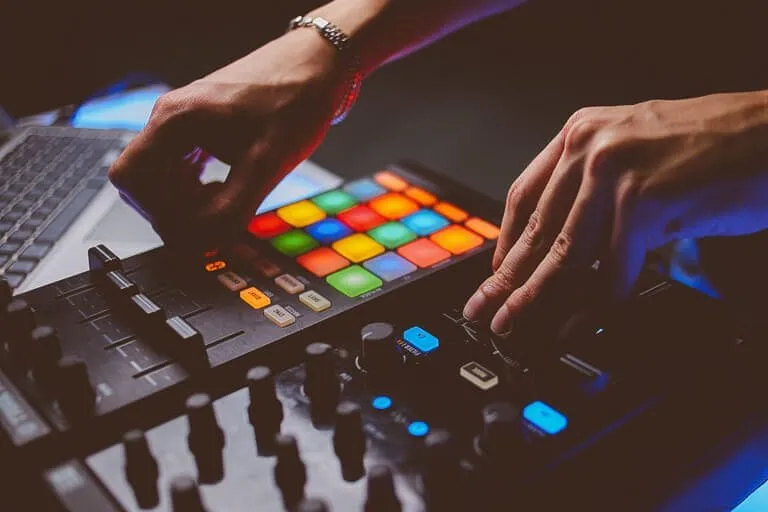
Beat Making Practice Test Questions
Prepare for the Beat Making exam with our free practice test modules. Each quiz covers key topics to help you pass on your first try.
Beat Making
Beat Making Exam Questions covering Beat Making. Master Beat Making Test concepts for certification prep.
Beat Making MCQ
Free Beat Making Practice Test featuring Beat Making MCQ. Improve your Beat Making Exam score with mock test prep.
Beat Making DAW Production Workflow
Beat Making Mock Exam on DAW Production Workflow. Beat Making Study Guide questions to pass on your first try.
Beat Making Drum Programming
Beat Making Test Prep for Drum Programming. Practice Beat Making Quiz questions and boost your score.
Beat Making Introduction to Beat Making
Beat Making Questions and Answers on Introduction to Beat Making. Free Beat Making practice for exam readiness.
Beat Making Mixing and Mastering Beats
Beat Making Mock Test covering Mixing and Mastering Beats. Online Beat Making Test practice with instant feedback.
Beat Making Music Theory for Beat Makers
Free Beat Making Quiz on Music Theory for Beat Makers. Beat Making Exam prep questions with detailed explanations.
Beat Making Sampling Techniques
Beat Making Practice Questions for Sampling Techniques. Build confidence for your Beat Making certification exam.
Beat Making Sound Design for Beat Makers
Beat Making Test Online for Sound Design for Beat Makers. Free practice with instant results and feedback.
- ✓Confirm your exam appointment and location
- ✓Bring required identification documents
- ✓Arrive 30 minutes early to check in
- ✓Read each question carefully before answering
- ✓Flag difficult questions and return to them later
- ✓Manage your time — don't spend too long on one question
- ✓Review flagged questions before submitting

Beat Making Classes
- +Validates your knowledge and skills objectively
- +Increases job market competitiveness
- +Provides structured learning goals
- +Networking opportunities with other certified professionals
- −Study materials can be expensive
- −Exam anxiety can affect performance
- −Requires dedicated preparation time
- −Retake fees apply if you don't pass
Beat Making Questions and Answers
About the Author

Applied Linguist & Language Proficiency Exam Specialist
Georgetown UniversityDr. Yuki Tanaka holds a PhD in Applied Linguistics and an MA in TESOL from Georgetown University. A former language examiner with the British Council, she has 18 years of experience designing and teaching language proficiency preparation courses for TOEFL, IELTS, CELPIP, Duolingo English Test, JLPT, Cambridge FCE/CAE, and Versant assessments worldwide.